One of the many things that LibreOffice does exceptionally well is formatting mathematical expressions. Since I on working with matrices quite a bit in the near future, I thought it might benefit me to see write in LibreOffice.
While I can write notes for myself in LibreOffice quite easily, the question becomes: can I share them on WordPress? And if I can, will WordPress display the matrices that I have created correctly or will they be mangled?
We shall soon see.
Here is an example matrix that was given by the LibreOffice how-to pages:
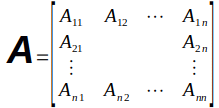
It is very easy to create and put in place. It looks fantastic in LibreOffice.
Next, here is a matrix that I have created myself using a much simpler version of the formula.

Now, I am going to save this as a html file and see if I can copy and paste it into the new WordPress block editor.
End result:
It seems like it works quite well. There is a downside, though. When I saved the document from LibreOffice’s default ‘odt’ format to ‘html’ format, it exported the formulas as images. When I copied the entire html file to WordPress’s new block editor, it left blanks for each of the images that needed to be inserted. While not a perfect solution, I think that is probably my best bet for now.
 Marisa Burnes (dot) com